

Accessibility in UX Design
Accessibility in UX Design
Enhancing e-Commerce Through Accessibility in UX Design
Accessibility: A Key Focus in e-Commerce
Imagine you're browsing an online store, but the text is too small to read, or the navigation is too complex to understand. Such issues can drive potential customers away, especially those with disabilities. In today's digital age, accessibility is not just a feature—it's a necessity. For e-commerce businesses, ensuring accessibility isn't just about compliance with standards; it's about expanding your market reach and improving user experience (UX) for everyone.
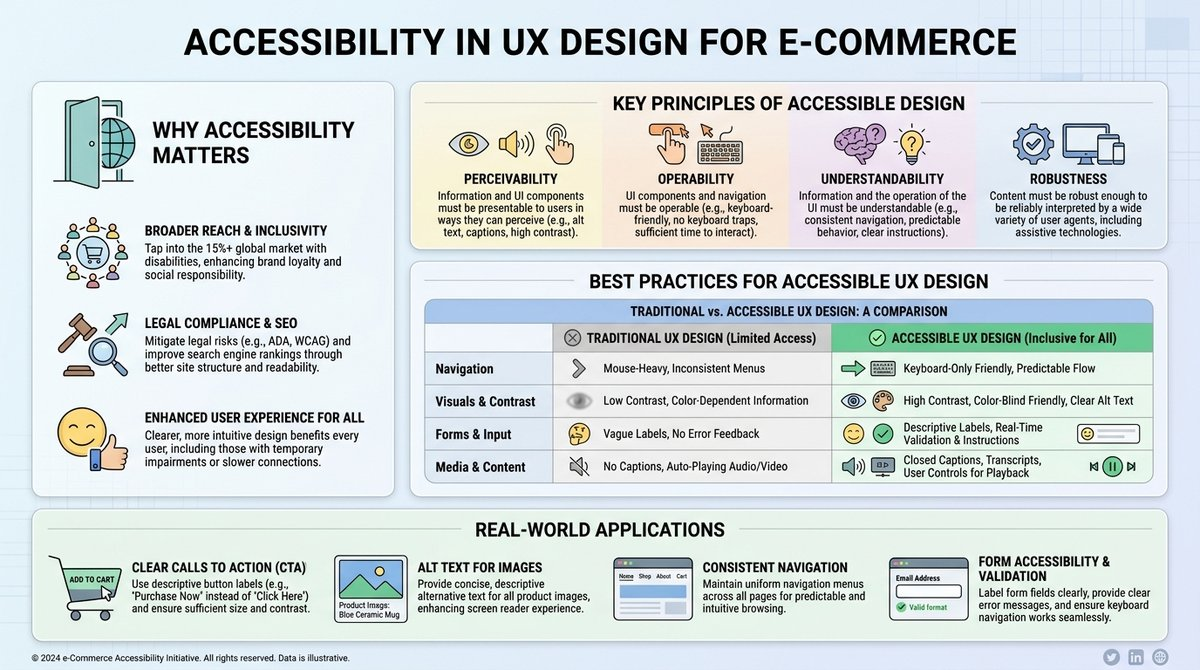
Why Accessibility Matters
By making their interfaces accessible, companies can tap into a larger customer base and foster loyalty among users who have often felt marginalized. Accessibility enhances usability, ensuring smoother navigation for all users, which can lead to increased sales and customer satisfaction.
Moving forward, we'll explore the fundamentals of accessibility in UX design, particularly within the e-commerce sector.
Understanding Accessibility in UX Design
What is Accessibility?
Accessibility in UX design refers to creating interfaces that are usable by people with various disabilities, including visual, auditory, motor, and cognitive impairments. It's about designing for inclusivity, ensuring that your digital spaces can be navigated by everyone, regardless of their abilities or limitations.
Key Principles of Accessible Design
- Perceivability: Information and user interface components must be presented in ways that users can perceive, regardless of their sensory differences.
- Operability: UI components and navigation must be functional and straightforward for all users.
- Understandability: Information and the operation of the user interface must be clear and easy to understand.
- Robustness: Content must be robust enough to be interpreted by assistive technologies, ensuring longevity and adaptability to user needs.
Connecting to Previous Lessons
In our previous lessons, we explored the basics of UX design, focusing on user-centered approaches and the importance of understanding the user's journey. Building on this foundation, accessibility becomes a pivotal dimension that integrates with these principles to create a truly inclusive e-commerce experience.
Diving Deep into Accessibility
Best Practices for Accessible UX Design
-
Use of Alt Text: Ensure that all images have descriptive alt text so that screen readers can convey information to visually impaired users.
-
Keyboard Navigation: Design your interfaces to be fully navigable using only a keyboard, benefiting users with motor disabilities.
-
Color Contrast and Text Size: Maintain high color contrast and adequate text size to aid users with visual impairments.
-
Transcripts and Captions: Provide transcripts for audio content and captions for video content to assist users with hearing impairments.
Common Pitfalls in Accessibility
-
Over-reliance on Color: Using color alone to convey information can be problematic for color-blind users. Always pair colors with text or icons.
-
Inconsistent Navigation: Complex or inconsistent navigation can confuse users, particularly those with cognitive disabilities.
-
Lack of Feedback: Not providing immediate feedback (such as error messages) can make interactions frustrating and unclear.
Misconceptions about Accessibility
-
"Accessibility is too expensive": While it might seem initially costly, integrating accessibility from the start reduces long-term costs associated with redesigns and potential legal issues.
-
"Accessibility limits creativity": On the contrary, it invites innovative solutions that enhance usability for all.
Below is a table comparing traditional UX approaches with accessibility-focused UX approaches, underscoring the differences and adaptations required.
| Aspect | Traditional UX Design | Accessible UX Design |
|---|---|---|
| Focus | General usability | Inclusivity for users of all abilities |
| Navigation | Visual-based, aesthetic-focused | Keyboard navigable, semantic, and intuitive |
| Feedback | Visual cues | Visual, auditory, and haptic feedback |
| Testing | General user testing and feedback loop | Specialized testing including assistive tech |
| Content Design | Aesthetic-led content creation | Content designed for assistive technologies |
Real-World Application in e-Commerce
Example 1: Clothing Retailer
Consider an online clothing store that implements accessibility features:
-
Descriptive Labelling: Every product image is paired with descriptive alt text and product details.
-
Easy Navigation: A streamlined navigation menu ensures customers can move easily between categories.
-
Inclusive Sizing Information: Products are displayed with detailed size information that is screen reader-friendly.
Impact of Accessible Design
Such measures not only improve user satisfaction and engagement but also open the business to a broader audience, including those who rely on assistive technologies to shop online.
Example 2: Online Grocery Service
An online grocery store can enhance accessibility through:
-
Voice Search: Enabling voice search helps users who may struggle with traditional text input.
-
Accessible Checkout: Simplifying the checkout process reduces complexity, making the final step less frustrating for users with cognitive impairments.
Broader Connections
By incorporating these features, companies ensure a seamless shopping experience that aligns with broader e-commerce goals of inclusivity and market expansion.
Integrating Accessibility into Your Design Process
Consistent Application and Feedback
To consistently integrate accessibility into your design, consider:
-
Regular Accessibility Audits: Periodic reviews ensure compliance with accessibility standards and highlight areas for improvement.
-
User Feedback: Engage with users who have disabilities to gain insights into their experience, making iterative improvements.
Closing Thoughts: Inclusive Design as a Strategic Advantage
Accessibility isn't just a checkbox; it's a strategic advantage that aligns with digital innovation and customer-centric strategies. As you refine your designs or embark on new projects, continually ask yourself: "How can I make this experience better for everyone?"
In the next lesson, you'll take this further with Basics of Wireframes and Prototypes, building on these principles to create more refined user experiences.