

Overview of the UX Design Process
Overview of the UX Design Process
Understanding the Role of UX Design in e-Commerce Success
In the bustling world of e-Commerce, where countless products vie for attention, the user experience (UX) is paramount. Imagine stumbling upon an online store with a confusing layout and sluggish navigation. Frustrating, right? This scenario isn't uncommon in poorly designed e-Commerce platforms, where potential customers leave empty-handed simply because the user experience deterred them. Ensuring a seamless and intuitive user experience isn't just an add-on; it's essential for sustaining engagement, driving sales, and building customer loyalty. Let’s delve into how UX design plays a pivotal role in crafting these experiences and why understanding the UX design process is crucial for anyone venturing into e-Commerce.
What is UX Design? Clarifying Key Concepts
Before diving deeper, it's vital to grasp what UX design entails. User Experience (UX) Design focuses on creating products that provide meaningful and relevant experiences to users. This involves usability, visual design, information architecture, and interaction design. The process aims to improve the satisfaction of users by making interactions simple and efficient.
Key Terms in UX Design
-
Usability: Refers to the ease with which users can learn and accomplish basic tasks in a system.
-
Information Architecture: The organization and structuring of content to help users find the information they need seamlessly.
-
Interaction Design: Ensures the user’s interaction with the product is as intuitive and efficient as possible.
Each of these terms connects to earlier discussions on design fundamentals and website structures, forming the backbone of what makes a strong UX design.
The UX Design Process: A Closer Look
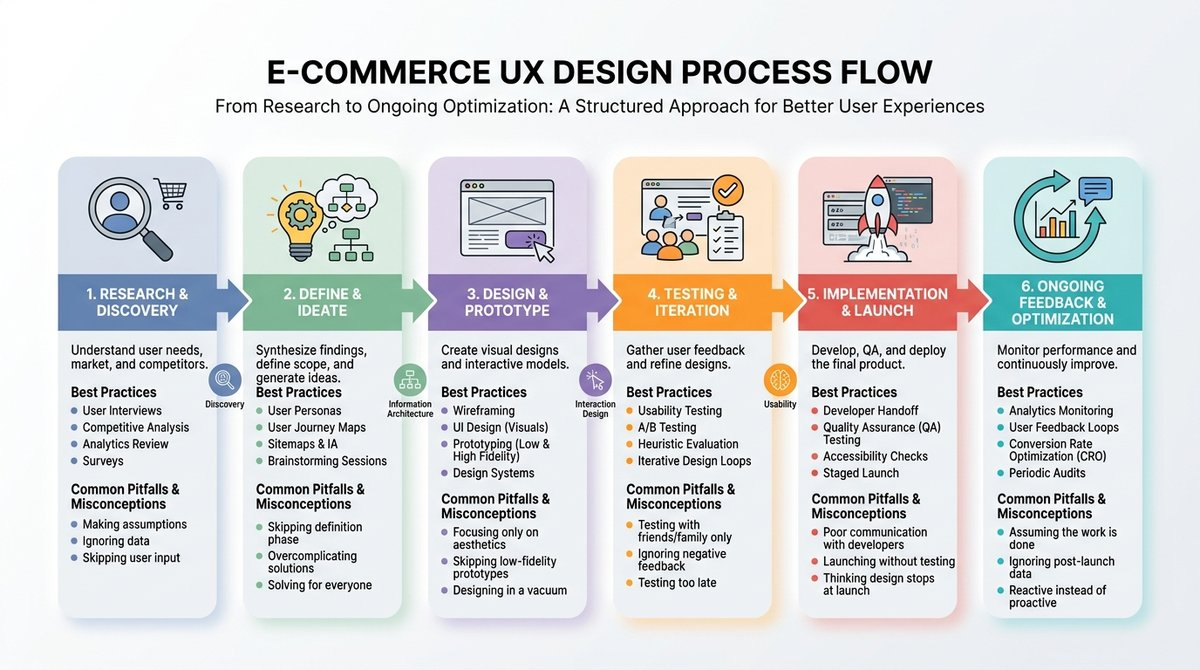
The UX design process is methodical, ensuring that every design choice aligns with user needs and business objectives. Here's a detailed look at this process, broken down into key phases:
Research and Discovery
The first step involves understanding user behaviors, needs, and motivations through observations and interviews. In e-Commerce, this could mean learning how users browse product categories or what information they seek before making a purchase.
Best Practice: Use a mix of quantitative and qualitative research to gather comprehensive insights.
Common Pitfall: Skipping user research due to time constraints can lead to designs that do not align with user expectations.
Misconception Clarified: UX design is not just about aesthetics—it's about solving real problems for users.
Define and Ideate
Following research, the information is analyzed to define the core problems to be addressed. It's essential to create clear user personas and journeys to guide design thinking.
Best Practice: Regularly revisit and refine personas to ensure they accurately reflect target users.
Common Pitfall: Overgeneralizing user personas, leading to ineffective solutions.
Design and Prototype
With a solid understanding of user needs, designers create wireframes and prototypes. This step is vital for visualizing the layout, functionality, and navigation paths of an e-Commerce site.
Best Practice: Incorporate feedback loops early and often with prototypes.
Common Pitfall: Rushing to create high-fidelity designs without testing low-fidelity ones first.
Testing and Iteration
Designs are then tested, typically in usability sessions, to gather feedback and identify potential issues. Iteration is crucial, allowing designers to refine solutions based on real user reactions.
Best Practice: Engage a diverse group of users to ensure feedback reflects a broad spectrum of personas.
Common Pitfall: Ignoring negative feedback due to resource limitations.
Implementation and Launch
Finally, validated designs are implemented and launched. UX designers often work closely with developers to ensure the design is executed accurately.
Best Practice: Maintain an open line of communication between designers and developers throughout the implementation phase.
Common Pitfall: Designing in a silo without considering technical constraints, leading to unexpected implementation challenges.
Ongoing Feedback and Optimization
Post-launch, ongoing testing and refinement ensure the user experience remains optimal as business objectives and user behaviors evolve.
Best Practice: Schedule regular reviews and updates to refine user interfaces with changing trends and feedback.
Misconception Clarified: Launching a product is not the end—continuous enhancement is key.
Real-World Applications in e-Commerce: Success and Learning
To illustrate the UX design process in action, let’s examine two examples from e-Commerce, emphasizing how a well-orchestrated design strategy can drive success.
Example 1: Improving Checkout Experience
An online shoe retailer faced high cart abandonment rates. An analysis revealed the checkout process was cumbersome, requiring users to navigate multiple pages.
-
Approach: The redesign introduced a single-page checkout. Wireframes were tested with users to streamline the steps.
-
Impact: Cart abandonment decreased by 20%, and sales conversions increased.
-
Limitation: Although checkout speed improved, ongoing updates were needed to adapt to mobile users more effectively.
Example 2: Enhancing Product Discovery
A home goods store noticed users struggled to find specific products amid a vast catalog.
-
Approach: Through user surveys, the team learned users preferred category-based navigation. Prototypes featured a revised menu structure and search functionality.
-
Impact: User satisfaction scores rose, with time spent in the catalog increasing by 30%.
-
Limitation: While the category structure worked well, continuous A/B testing was essential to perfect search algorithms.
Both examples underscore the impact of a thoughtful UX design process, showing tangible results in user satisfaction and revenue.
Reflecting and Moving Forward
The UX design process revolves around understanding and addressing user needs through a series of well-defined, iterative steps. This approach not only enhances user satisfaction but also drives business outcomes. The principles and strategies discussed here equip you with a foundation in UX design, ready to be applied to any e-Commerce challenge.
Now that the foundation is in place, practice reflecting on each project's unique context and be prepared to adapt UX strategies accordingly. With these skills, you’re set to make meaningful contributions to any e-Commerce venture, creating experiences that delight and retain users.