

Key Elements of UX Design
Key Elements of UX Design
Understanding User Experience in e-Commerce
In the bustling world of e-Commerce, user satisfaction is paramount. Imagine visiting an online store that's poorly organized, slow to load, and frustrating to navigate. Chances are, you would quickly leave and search for a more user-friendly alternative. The experience you have while interacting with a digital platform is referred to as the User Experience (UX). Effective UX design not only pleases users but also drives successful business outcomes. It is within this context that we delve into the key elements of UX design, setting the foundation for creating seamless and engaging digital experiences for users.
What Makes Up a Great User Experience?
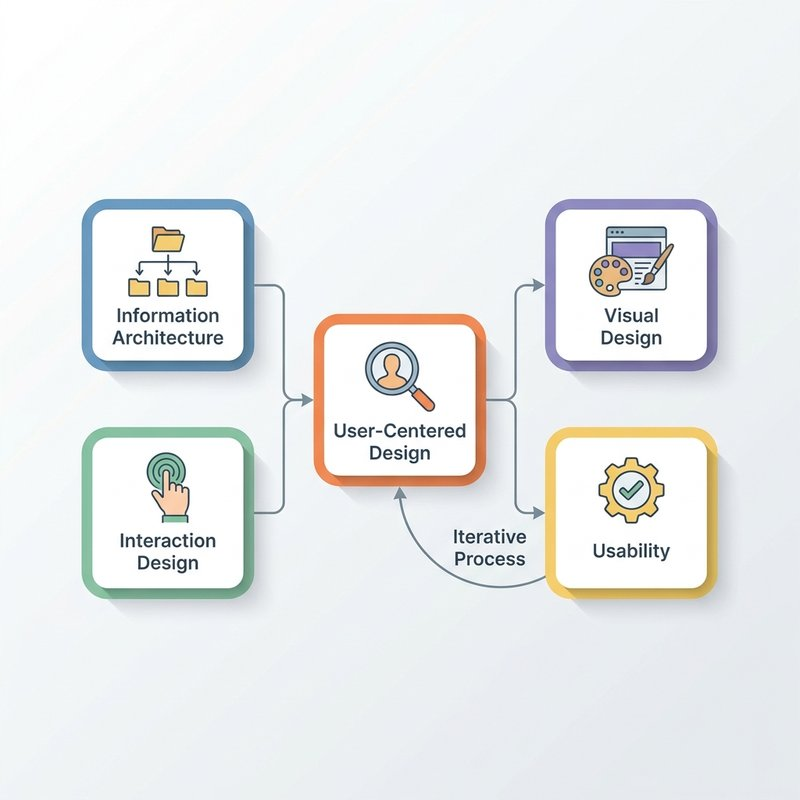
A great User Experience in e-Commerce isn't just about pretty interfaces; it's an ecosystem of several interrelated components. Understanding these elements facilitates the creation of products that are not only useful but also delightful to use. Let's explore some foundational concepts of UX design:
-
User-Centered Design (UCD): At the core of UX is the emphasis on designing for the user. UCD is a framework that revolves around understanding the user's needs, seeking user feedback, and integrating insights into the design process. This involves extensive user research to inform design decisions.
-
Information Architecture (IA): This refers to the organization, structure, and labeling of content in an effective and sustainable way. The primary goal of IA is to help users find information and complete tasks.
-
Interaction Design (IxD): This entails creating engaging interfaces with logical and thought-out behaviors and actions. This includes the design of interactive elements like buttons, sliders, and other components that a user interacts with on a website or application.
-
Visual Design: Often called the 'skin' of the interface, visual design focuses on the aesthetics of a product. This includes the color scheme, typography, and imagery that make the product visually appealing but also supports the user's emotional connection to the design.
-
Usability: Refers to the ease of use and learnability of a product. A usable product is efficient, effective, and satisfying to use.
Exploring the Depths of UX Design
Let's dive deeper into these key elements of UX design, exploring each one's nuances and impact on the overall User Experience.
User-Centered Design: Walking in the User's Shoes
Best Practices: At the heart of UCD is the necessity to walk in the user's shoes. Conduct user interviews, surveys, and usability testing to gather deep insights about user behaviors and preferences. Iteratively design, test, and refine based on real user feedback. Prioritize fundamental user needs over aesthetic decisions.
Common Pitfalls: A frequent misconception is assuming what the user wants without actual data. This leads to products that fail to address user needs effectively. Additionally, relying too heavily on aesthetic elements over functionality can deter from a good user experience.
Framework In Practice: By using personas and user scenarios, designers can accurately account for different user groups' varied needs. This ensures that the design is comprehensive and inclusive.
Information Architecture: Structuring Content for Clarity
Best Practices: Begin with conducting content audits and card sorting exercises to determine how best to categorize and structure content. Use sitemaps and wireframes to visualize the layout and flow of information across a platform.
Common Pitfalls: Avoid overcomplicating navigation structures. User frustration often arises from information being buried too deeply within a convoluted system.
Table: Effective Information Architecture
| Principle | Description |
|---|---|
| Hierarchical | Organizes content in a tree structure, from broad to specific. |
| Sequential | Guides the user in completing tasks through a series of steps. |
| Matrix | Provides multiple ways to reach the same content, accommodating diverse user paths. |
Interaction Design: Crafting Seamless Interactions
Best Practices: Create interactive prototypes to test concepts and gather feedback. Focus on intuitive, responsive design with clear feedback mechanisms (like button animation or loading indicators).
Common Pitfalls: Over-engineering interactions can lead to confusion. Ensure that interfaces remain clean and do not overload users with too many options at once.
Visual Design: Emotional and Aesthetic Impact
Best Practices: Visual design should align with the brand identity and evoke the desired emotional response from users. Use color theory to influence user perception and behavior effectively.
Common Pitfalls: Prioritizing aesthetics over usability can lead to designs that, although visually appealing, hinder the user journey and task completion.
Applying UX Design in the Real World
Example 1: Streamlining Checkout Processes
An online retailer noticed high cart abandonment rates. By applying UX principles, they simplified their checkout process:
-
Reduced the number of steps to complete a purchase.
-
Implemented auto-fill and guest checkout options.
-
Provided a real-time progress indicator.
Impact: This redesign resulted in a 30% increase in completed transactions, illustrating how UX design can directly boost conversion rates.
Example 2: Revamping Product Pages
A fashion e-Commerce platform revamped its product pages to enhance user engagement and discovery:
-
Incorporated high-quality images and videos for interactive browsing.
-
Integrated customer reviews and recommendations based on search history.
-
Improved loading times for seamless experiences on all devices.
Impact: The result was a marked increase in session duration and a reduction in bounce rates, highlighting how targeted UX enhancements can improve site performance.
Bringing It All Together
The key elements of UX design are vital contributors to creating a user-friendly digital experience. By understanding these components, you can design products that not only meet but exceed user expectations and business goals. Each element, from User-Centered Design to Visual Design, plays a critical role in crafting the overall experience a user has with a product.
Now that the foundation is in place, we'll move into the Overview of the UX Design Process, where the structure of these elements becomes even more practical.